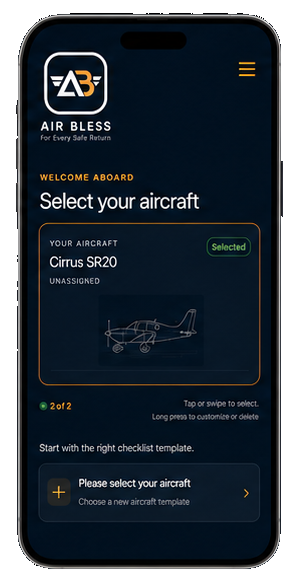
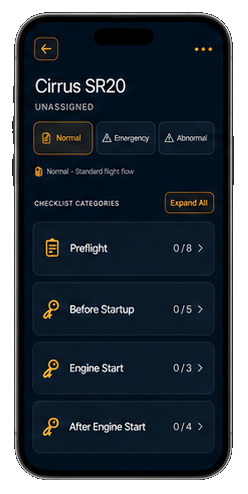
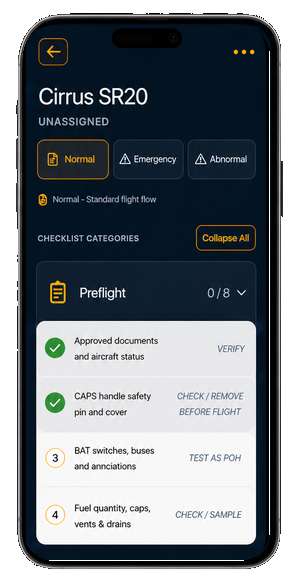
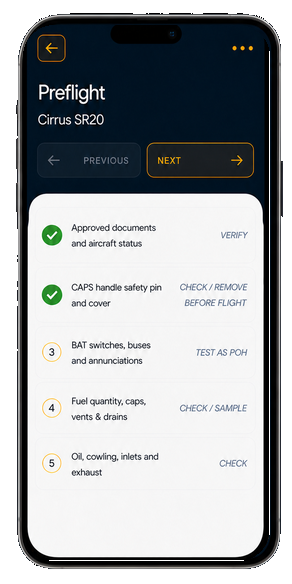
WHY IT MATTERSOpen InstantlyPick it up, and the page you need is already in view. Once your aircraft is configured, AirBless can also open your checklist on launch.
AirBless™ Aircraft Checklist
Like a paper checklist.
— Already on the right page
A focused, fully customizable digital checklist built for pilots, designed to move naturally from one item to the next.
Works in your browser · Offline · No account required
Always verify each template against your aircraft’s approved POH/AFM.
WHY PILOTS CHOOSE AIRBLESS
AirBless keeps the familiar checklist habits you already trust, with a smarter digital flow that stays within natural reach and requires no new gestures to learn.
— Bringing a modern, jet-age checklist experience to every steam-gauge cockpit.
WHY IT MATTERSOne Purpose, Nothing ExtraAirBless focuses on one thing: the checklist. It is not trying to become a moving map, weather app, flight tracker, digital logbook, navigation system, or flight-planning platform. When you open it, there is no need to decide which feature to use. No unrelated information competes for your attention.
WHY IT MATTERSNatural WorkflowDesigned so your thumb does not need to stretch or extend. The checklist begins at your thumb’s natural resting position—not at the top of the phone—so each item starts within an easy reach.
WHY IT MATTERSClear Progress at a GlanceCompleted items turn into a clear visual state, so you can see what is done and what still needs attention without rereading the whole page.
WHY IT MATTERSFully CustomizableAdd aircraft details, categories, section headings, checklist items, and Checklist Notes for aircraft data such as rotation speed, best angle of climb, and important radio frequencies—or the name of someone special. Adjust responses, icons, and order so the digital version matches your approved paper checklist, your workflow, and your preferences.
WHY IT MATTERSAdapts to the PilotChoose double tap or long press, expand or collapse sections, and arrange your checklist around the way you actually fly.
WHY IT MATTERSYour Phone Is Already With YouYour phone is already with you before, during, and after a flight. AirBless keeps the checklist close without adding another piece of equipment.
WHY IT MATTERSSharing & BackupLong press an aircraft card to create a shareable link for its completed checklist setup. Save it as a personal backup, copy it to another device, or send it by AirDrop, message, or email—or share it with another pilot, student, or instructor. When the link is opened, the aircraft and its customized checklist are added to AirBless as a new aircraft card. Because AirBless currently does not require a user account, sharing is also a simple way to preserve or transfer a completed checklist setup.
WHY IT MATTERSDesigned for Different PilotsAirBless supports student pilots, aircraft owners, rental pilots, and flight instructors. Student pilots get a clear flow to follow; owners can customize their aircraft checklist; rental pilots can keep a spare checklist ready; instructors can share a prepared checklist with students.
TWO WAYS TO BUILD YOUR CHECKLIST
Start from zero—or start with a proven structure.
BUILD IT YOUR WAY
Create Custom Checklist
Blank checklist · Complete manual controlBegin with nothing and create every type, category, section heading, item, response, and icon yourself.
RECOMMENDED
Choose a Template
General templates · Aircraft-specific templatesStart with an organized structure, then customize it until it matches the approved paper checklist for your aircraft.
General Template 1Grouped Flight PhasesGround · Airborne · Post-Flight
General Template 2Detailed Flight PhasesPre-Flight through Post-Flight
Always compare and adjust a template against your approved paper checklist and POH/AFM before use.
AIRBLESS QUICK START GUIDE
From first opening to a flight-ready checklist.
Open AirBless
No account is required. Choose Home or your current checklist as the screen AirBless opens to.
Select your aircraft
Build a checklist from scratch, choose a General Template, or begin with an aircraft-specific template.
Choose your layout
General Template 1 groups the flight into Ground, Airborne, and Post-Flight. General Template 2 keeps every flight phase separate.
Match your paper checklist
Before operational use, customize the template against the approved checklist for your specific aircraft.
Complete each item
Double tap or long press to mark an item complete. Clear progress and haptic feedback keep the flow easy to follow.
Reset and take notes
Long press to reset a list, category, or full checklist when needed. Notes remain available until you remove them.
Share and back up
Long press an aircraft card to share its completed structure as a link for yourself or another pilot.

For Every Safe Return